 ValueGameNode
At ValueGameNode / VGNCloud, we utilize a modern Enhance-powered control panel to make website management as effortless as possible. Whether you are launching a personal blog or a business site on our Hello World (2€/mo) plan, our automated installer handles the technical heavy lifting—including database creation and core configuration—so you can focus on building your content.
Prerequisites
Before starting, ensure you have:
-
An active hosting subscription (e.g., Hello World).
-
Your login credentials for web.vgncloud.com (sent via email after purchase).
-
A domain name you wish to use.
Step-by-Step Installation
1. Access the Web Panel
Log in to your dashboard at web.vgncloud.com. This is your central hub for managing files, databases, and emails.
2. Initiate the Website Creation
Once logged in, look for the Websites section in the left-hand sidebar or the main dashboard. Click the Add website button to begin the setup wizard.
3. Choose "Install an App"
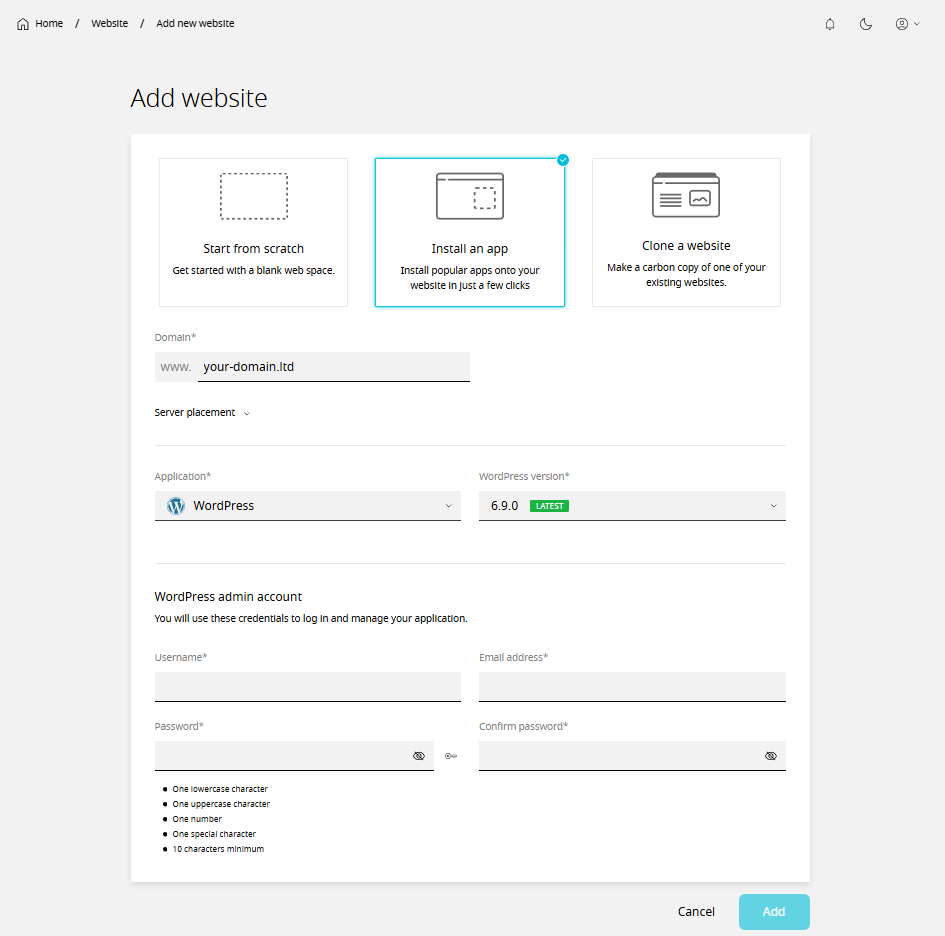
You will be presented with different ways to set up your site. Since we are deploying WordPress, select Install an app. This method ensures that the environment is optimized specifically for WordPress performance.
4. Domain and Application Selection
-
Domain: Enter the domain name you purchased.
-
Application: Select WordPress from the dropdown menu.
-
Version: It is recommended to select the latest stable version provided to ensure security and compatibility.
5. Configure WordPress Admin Details
You will need to define your WordPress login credentials. This information is separate from your VGNCloud panel login:
-
Admin Username: Choose a unique username (avoid "admin" for security).
-
Admin Email: Use an active email address for password recovery.
-
Password: Use a strong, unique password.
6. Finalize Installation
Click the Install button. The system will now automatically create the database, link the files, and set up the WordPress core. Within a few moments, your site will be live and accessible.